


 Current
location:
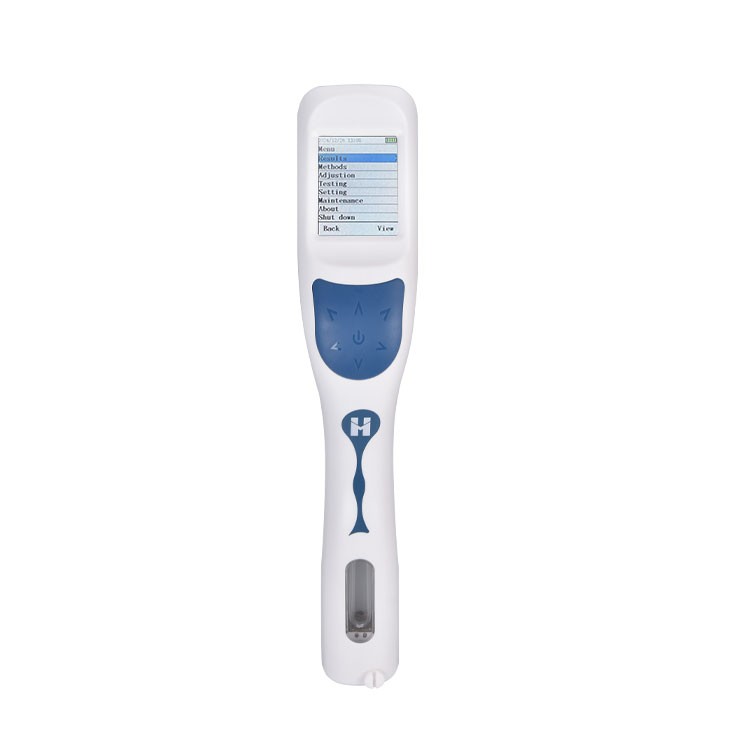
For handheld density measurements, consistent cell filling and sample identification deserve as much attention as the displayed value. HM-DS uses an internal pump to introduce liquid into its oscillating U-tube. Retain the measured temperature and any applied correction with the density result.
A practical measurement workflow
- Assign the sample ID and check the instrument with the prescribed reference material.
- Introduce the sample, watching for incomplete filling or trapped bubbles.
- Measure under the accepted temperature conditions and save the result.
- Clean the fluid path before moving to the next liquid and export the field records.
How the measurement works
HM-DS measures liquid density using U-tube oscillation and provides density-related concentration calculations. The manufacturer lists barcode and QR-code scanning, NFC functions, local record storage and USB transfer. These functions support a traceable field workflow when sample IDs and measurement settings are used consistently.
Manufacturer-listed configuration
The HM-DS from HM Instruments provides the example configuration in this guide.
| Item | Listed specification |
|---|---|
| Listed instrument mass | 350 g |
| Typical pumped volume | Approximately 1.0–2.3 mL |
| Local storage | 1,000 historical records |
Interpreting the result
Temperature correction and concentration conversion depend on the selected relationship. Keep the raw density, measured temperature and calculation settings available for review.
Common questions
Is the Bluetooth printer included as standard?
The saved HM-DS configuration lists it as optional.
What information should travel with a field result?
Keep sample ID, density, temperature, correction settings and reference-check status together.
Retain the sample identity, method settings and control results with the reported measurement. Use the operating procedure supplied for the selected configuration.
Article address:https://www.labinstruments.net/news/avoiding-filling-errors-in-handheld-density-tests.html